
Stop Guessing.
Start Knowing.
Real-time reporting on temp labor spend, performance, and trends. Built for construction operations, not generic workforce analytics.
Most contractors can't answer basic questions about their temp labor.
What did we spend on temp labor last month? Which supplier delivers the best workers? Which jobsite is over-burning labor? Which trades are costing more this year than last?
Most contractors can answer none of these with confidence, because the data lives in five different agency portals, a dozen spreadsheets, and one foreman's memory.
If you've felt any of this in the last 30 days, you're not alone.
Within 30 days of going live with SLM, our clients report:
- → One source of truth for every worker on every job
- → Hours of admin work returned to the team every week
- → Clear answers to questions that used to take a meeting
- → Confidence that what's invoiced is what was worked
The data that runs your business, finally in one place.
Every hour, every dollar, every worker, every supplier — captured in one system and reported back to you in real time. You can see what's happening today, this week, this quarter, or year over year.
Drill into a single jobsite or zoom out to the whole company. And finally answer the questions your CFO and project executives have been asking for years.
Built to do the work, not just describe it.
Every feature was designed by people who've actually managed construction temp labor — not workforce software generalists.
Live Dashboards
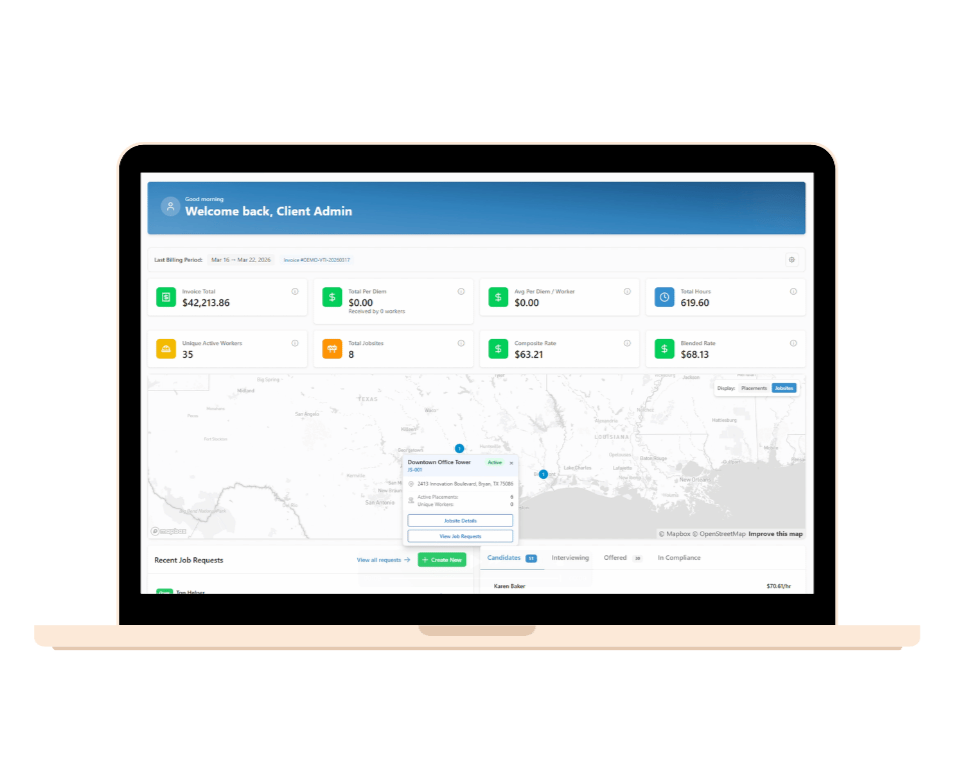
Spend, headcount, and performance by jobsite, supplier, or trade — updated in real time.
Supplier Scorecards
See which agencies are delivering quality workers on time — and which aren't earning their spot in your network.
Trend Reporting
This month, quarter, and year compared to history — spot patterns before they become problems.
Drill Down to Detail
From a company-wide view down to a single worker on a single jobsite — in a few clicks.
Reporting and visibility for construction temp labor
What tools are available to improve visibility and reporting for temporary labor in construction?
SLM is built for exactly this. It gives you live dashboards on spend, headcount, and performance by jobsite, supplier, or trade, plus supplier scorecards, trend reporting, and drill-down detail all the way to a single worker on a single site. Instead of piecing together data from spreadsheets and agency portals, you get one system with real-time visibility built specifically for construction temp labor.
How does SLM report on temp labor spend and performance?
Every hour, dollar, and worker is captured in SLM as work happens. Live dashboards show spend and headcount in real time, supplier scorecards rank agency performance, and trend reports compare this month, quarter, or year against history — all viewable company-wide or drilled down to a single jobsite.
Can I see temp labor data broken down by jobsite, supplier, or trade?
Yes. Every report can be filtered and viewed by jobsite, supplier, or trade, then drilled down further to an individual worker. You can zoom out to a company-wide view or zoom into one site in a few clicks.
Does SLM replace the spreadsheets and agency portals we use for reporting today?
Yes — it consolidates them. Instead of pulling data from five different agency portals and a stack of spreadsheets, SLM captures everything in one system and reports it back in real time, so answers that used to take half a day take seconds.
See the reports your CFO has been asking for.
A 30-minute walkthrough is the fastest way to understand what SLM does and whether it fits your operation. No slides. No pitch. Just the platform and a conversation.
Schedule a Walkthrough →